Hover Prompt by Digisync
You talk.
It follows.
A lean teleprompter for anyone recording to camera, on a call, or presenting. Speak naturally, without memorizing a script or looking away from the lens.
The script follows your voice, word for word, on iPhone, iPad, and Mac. There is no scroll speed to set. Pause, and it waits.
Free with the demo script. Launch offer: $9.99 once, on iPhone, iPad, and Mac, for the first 1,000 buyers. Launch pricing; lifetime buyers keep everything.

Welcome. Read this out loud, in your own time, and watch what happens. This is not a script that scrolls on its own. It listens as you speak, and the highlight follows the words you say.
The scroll never has your pace.
What gets in the way
A timed scroller runs ahead or lags behind. Your eyes leave the lens while you look for your place.
How it feels
You feel awkward, you lose your place, and you start another retake.
What should be true
You shouldn't have to read at a machine's pace.
On your device
A prompter that listens.
Recording to camera, taking a call, or presenting is hard enough when the words are ready and your eyes are somewhere else. Hover Prompt stays with the sentence you are actually saying.
Digisync built it as a lean teleprompter. Apple's speech recognition runs on your iPhone, iPad, or Mac and matches what you say to your script, word for word. Names and unusual words from your script are given to the recognizer as hints, so they are easier to match. Skip a word or speed up, and it catches up.
No account. Your scripts stay on your device. Your voice is not recorded, saved, or sent anywhere. Anonymous usage stats only, never your scripts or voice, and you can turn stats off in Settings.
The plan
Three steps, then you talk.
-
1. Download
Get Hover Prompt
Install it on your iPhone, iPad, or Mac. The launch offer is $9.99 once, on all three.
-
2. Add your words
Paste a script, or use the demo
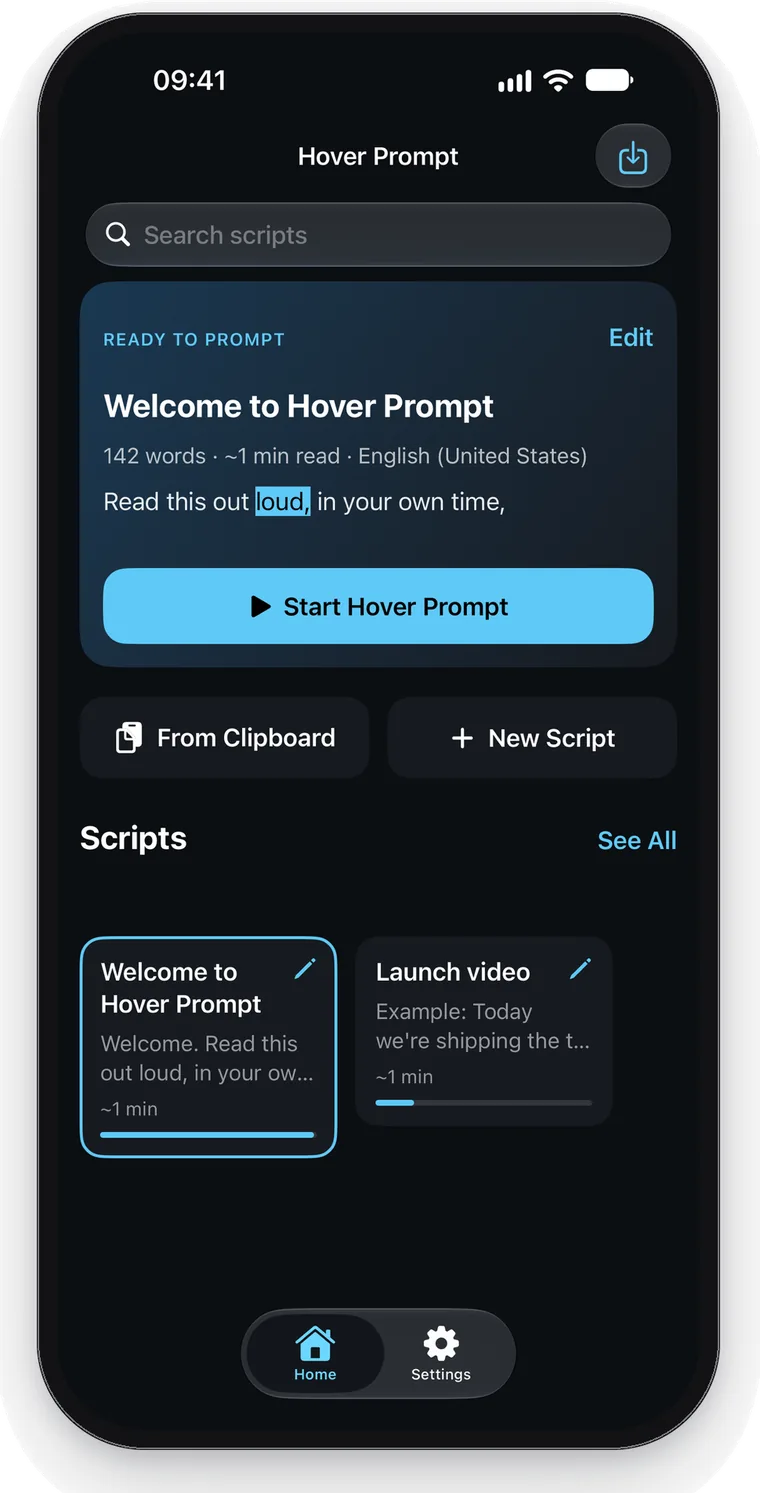
On iPhone and iPad, paste from the clipboard, start a new script, or import a .txt, .md, or .rtf file. On Mac, paste a script or import a .txt, .md, .rtf, or .docx file. The free demo is already there.
-
3. Press play
Talk in your own time
The current word lights up and the script moves with you. Stop speaking, and it waits.
Before you buy
- No account. Hover Prompt does not ask you to sign up.
- On the device. Your script and your voice stay on the iPhone, iPad, or Mac you are using.
- Demo first. The free demo script lets you try voice sync. Your own scripts unlock with the launch offer.
- iPhone iOS 17 or later
- iPad iPadOS 17 or later
- Mac macOS 13 Ventura or later
Start with the demo.
Unlock your scripts.
The bundled demo is free. Read it out loud and watch the highlight follow your voice. Your own scripts stay locked until you unlock Hover Prompt.
iPhone and iPad
Your script. Next to the lens.
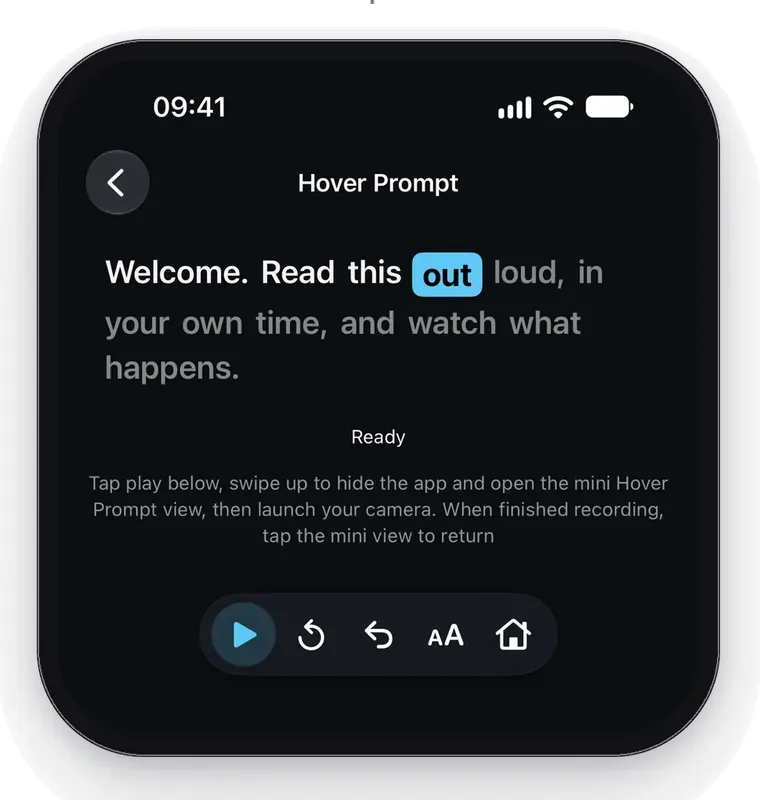
Press Play, then open Camera or another app you record video with. Your script appears in a floating window, using Picture in Picture, that you can drag next to the lens. It only comes up while you are reading, not when the script is paused.
Hover Prompt does not record the video. You record in the camera app you already use. A green mic meter shows that Hover Prompt can hear you.
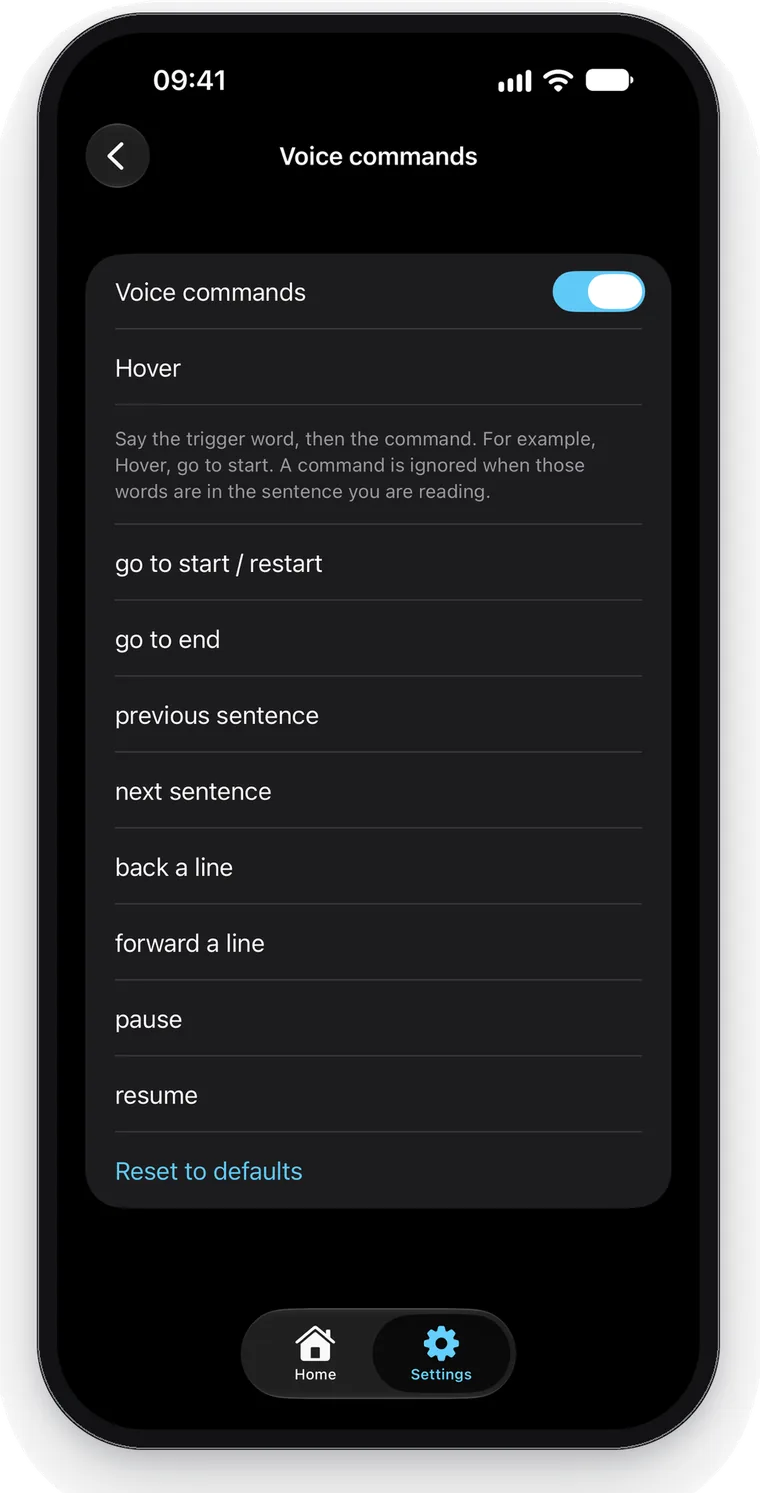
Hands full? Just say Hover.
Voice commands are on iPhone and iPad only. Say a trigger word, then a command, so your hands stay free while you record. The default is Hover, then go to start, go to end, next sentence, or previous sentence. You can change the trigger word and the phrases in Settings.
Mac
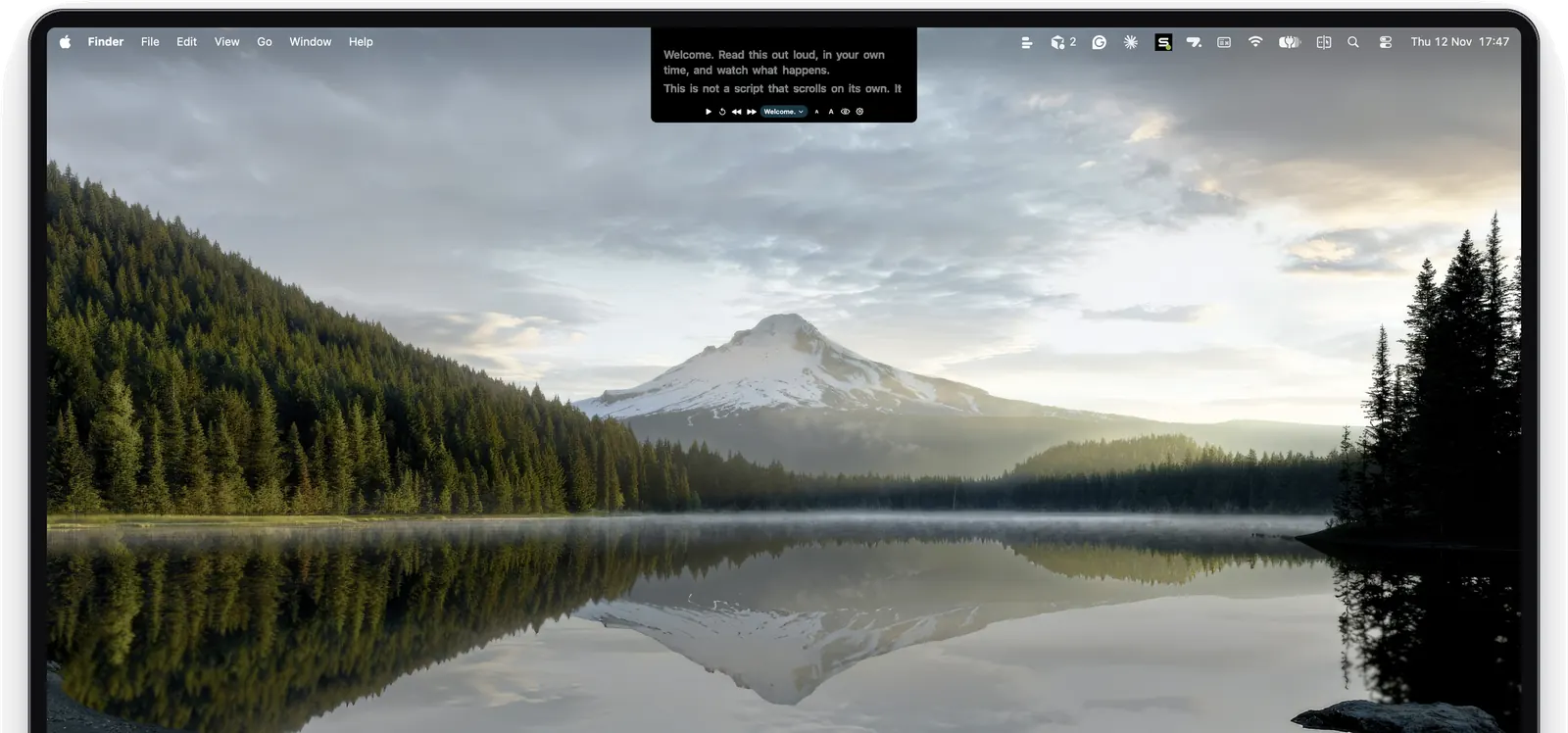
Reads from the notch.
Your script sits right under the camera. Island mode hangs it from the notch on MacBooks that have one. Classic mode shows a floating card under the menu bar, for Macs without a notch or for an external display. Hover over the prompter to show Play and the other controls. It lives in the menu bar, with no Dock icon.
Keyboard shortcuts
Speech keeps running when you hide the prompter. Settings lists these shortcuts.
- Hide or show: Control-Option-Command-H
- Restart from the top: Control-Option-Command-R
- Jump back a sentence: Control-Option-Command-B
- Jump forward a sentence: Control-Option-Command-N
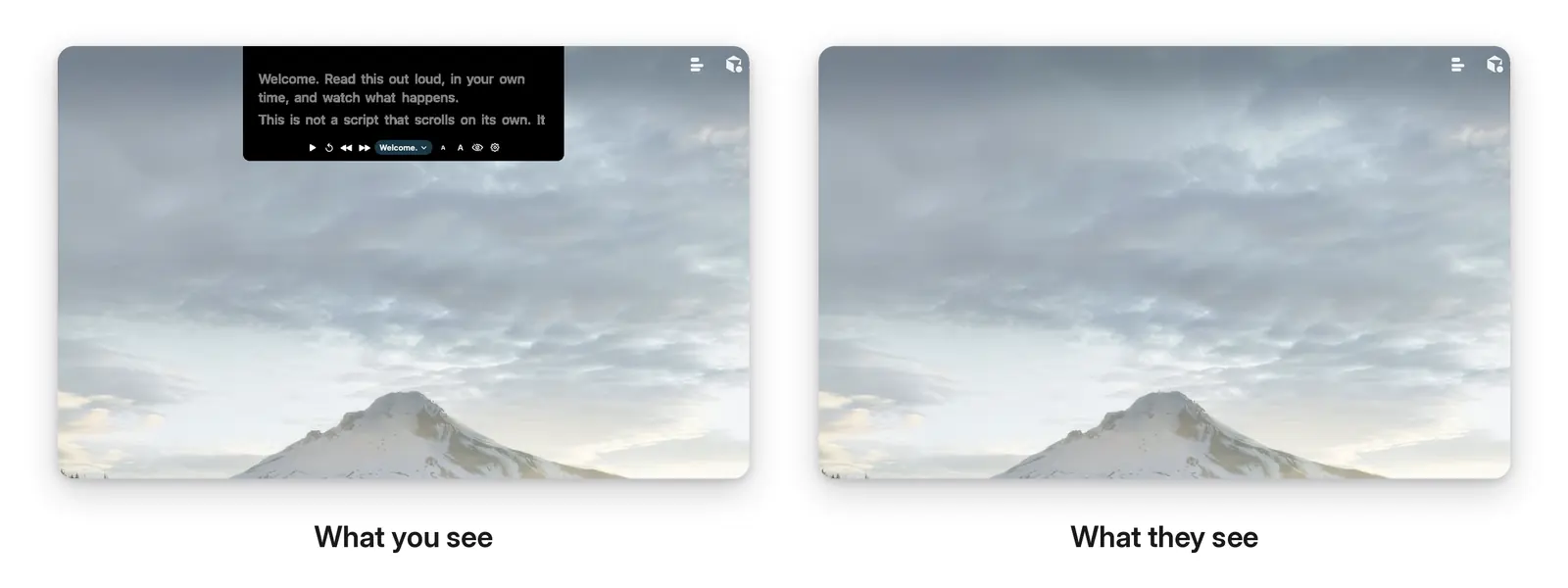
On your screen. Not in the share.
The prompter tries to stay out of screen sharing and recording. This is always on. It is best effort only: some apps and newer versions of macOS still show it, so check a capture before you rely on it.
Yours to set
Your highlight. Your color.
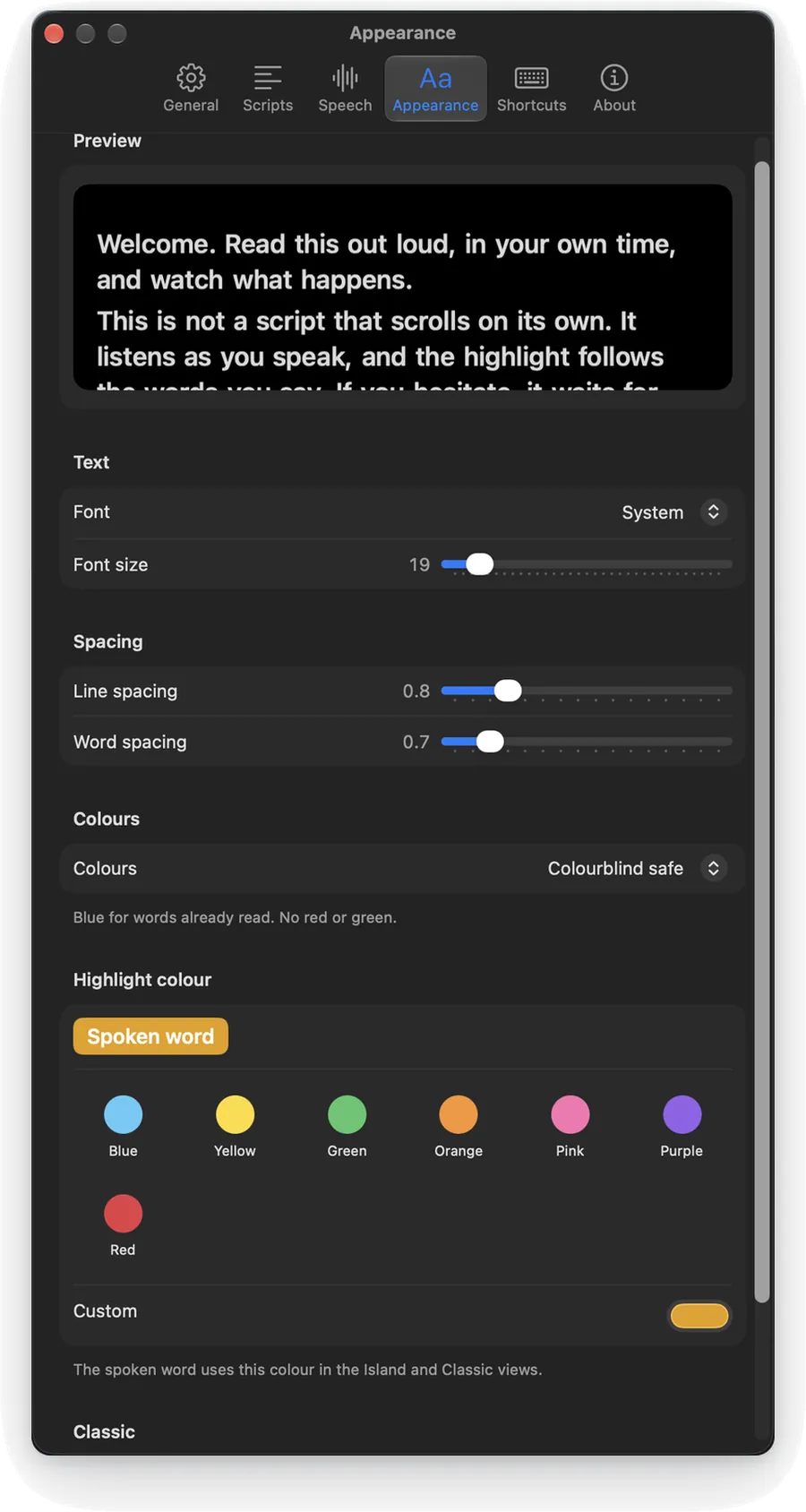
Choose a highlight color from presets, including yellow, or pick a custom color. Adjust the font, size, and spacing, with a live preview.
Keep your scripts in a library and switch between them. On iPhone and iPad, recent scripts sit on the Home screen. On Mac, they are in Settings, under Scripts.
What a fighting scroll costs
Stilted takes. Wasted retakes. A look that drops off the lens and into a notes app, while the words keep moving without you.
Eyes up. One take.
You speak in your own time. The highlight stays with the word you are saying. You look at the lens, and the take feels like you: confident, natural, and finished in one go.
Fewer retakes
The prompter waits when you pause and catches up when you skip.
Eyes on the lens
The script sits next to the camera, so you look at the lens, not a notes app.
A lean tool
A teleprompter that listens. No suite to learn. Launch offer: $9.99 once, for the first 1,000 buyers. Launch pricing; lifetime buyers keep everything.
Try the demo, then unlock.
$9.99 once, for the first 1,000 buyers, on iPhone, iPad, and Mac.
The built-in demo script, Welcome to Hover Prompt, is free, and voice sync works on it. Launch offer: unlock Hover Prompt for $9.99 once. Launch pricing; lifetime buyers keep everything.
Creating, pasting, importing, or editing your own scripts stays locked until that unlock. The demo stays playable.
Questions
How much does Hover Prompt cost?
The built-in demo script is free, and voice sync works on it. Launch offer: unlock Hover Prompt for $9.99 once, on iPhone, iPad, and Mac, for the first 1,000 buyers. Launch pricing; lifetime buyers keep everything. Your own scripts stay locked until that unlock. After you unlock, you can paste, import, or edit them.
Where do my script and my voice go?
Your script stays on your device. Speech recognition runs on your iPhone, iPad, or Mac and does not fall back to a server. Your voice is not recorded, saved, or sent anywhere. Hover Prompt does not need an account. Anonymous usage stats only, never your scripts or voice, and you can turn stats off in Settings. Purchases are handled by Apple. Details are in the Hover Prompt privacy policy.
Which devices does it run on?
Hover Prompt runs on iPhone (iOS 17 or later), iPad (iPadOS 17 or later), and Mac (macOS 13 Ventura or later). On iPhone and iPad, allow Microphone and Speech Recognition, turn Dictation on, and use a language with an on-device speech model. On Mac, turn Dictation on in System Settings, under Keyboard. Voice commands are on iPhone and iPad only. Setup steps are on the Hover Prompt support page.
Does Hover Prompt work offline?
Reading and voice sync happen on the device. Hover Prompt does not send your script or your voice over the network. Download the on-device speech model before you start. A network connection is used for the App Store purchase and for optional anonymous usage stats.
Speak on the next take
with your eyes on the lens.
Free demo script. Then $9.99 once, for the first 1,000 buyers, on iPhone, iPad, and Mac. Launch pricing; lifetime buyers keep everything.